Linux Enterprise: What Checkmk administrators need to know about Debian 13, RHEL 10 & Co.
 on Dec 17, 2025
Checkmk now officially supports the latest major releases of Red Hat Enterprise Linux (RHEL) 10, Debian 13 Trixie, and SUSE Linux Enterprise Server (SLES) 15 Service Pack (SP) 7. This makes it an ideal time to treat your own operating system to an upgrade. In this article, we will guide you through the most important new features, especially in RHEL 10. If you have already made up your mind or decide to do so while reading this article, we have documented where you can find the package sources and how you can update your operating system: Click here for the official Checkmk manual with installation instructions for RHEL 10, Debian 13 Trixie, and SLES 15 SP7.
Perhaps one of your resolutions for 2026 is already a ‘system upgrade’. If you are still hesitating, here are a few arguments for updating to one of the current major versions:
- The time factor: longer support periods (for LTS versions),
- compliance with your existing company guidelines,
- better performance, e.g. thanks to the latest kernel versions,
- hardware requirements, and improved security.
First, the most obvious reason: you get more out of version 10.x for longer. The providers will support their latest operating system for five to ten years:
- Red Hat plans to support RHEL 10 until 2035, with support for previous versions ending in 2029 and 2032.
- Debian guarantees support for Debian 13 Trixie in the LTS version until 2030 – compared to 2028 for Bookworm and 2026 for Bullseye.
- SUSE will keep your Enterprise Linux servers for SLES 15 SP7 (LTS) alive until 2034. General support for SLES 15 SP6 ends on New Year's Eve 2025: Alas, it's time to give your monitoring a refreshed operating system as a foundation. LTS customers of the previous SLES version still have until 2028 to do so.
TL;DR:
Checkmk now officially supports RHEL 10, Debian 13 (Trixie), and SLES 15 SP7 – making this a good time to plan an OS upgrade.
- Longer support lifecycles (RHEL 10 until 2035, Debian 13 LTS until 2030, SLES 15 SP7 until 2034) improve long-term planning.
- Technical improvements such as modern LTS kernels, better performance, updated hardware support, and stronger security also benefit monitoring.
- Checkmk requirements: Full support requires a current Checkmk version (Debian 13 is supported only with Checkmk 2.4.0).
- Focus on RHEL 10: Image Mode, Image Builder, an AI-powered CLI assistant, and stricter OpenSSL/FIPS security introduce both advantages and new operational challenges.
Impact of Linux updates on Checkmk monitoring
The basis of the current Linux operating systems has been fundamentally renewed in some areas. Similarities and differences are particularly noticeable in the kernel:
SUSE does not rely on the latest upstream Linux kernel, but equips SLES 15 SP7 with the Linux kernel 6.4, which was released in 2023. The project uses backports to implement an older, stable LTS kernel, which at the time received new BPF functions and improved memory management, but is no longer completely up to date. Backports adapt (‘backport’) new device drivers and patches for running new hardware on older kernel versions. This allows the transition to more recent kernel versions to be cushioned for a while. However, the current Linux kernel development has already reached version 6.18 (LTS) since November 2025 – the development gap is smaller for Debian and RHEL:
Debian 13 Trixie and RHEL 10 contain the previous LTS kernel 6.12 from November 2024. Between kernel 5.14, which is used in the previous release RHEL 9.6, as well as kernel 6.1 in Debian 12 Bookworm and the currently used kernel 6.12, a lot has changed: Better hardware support and improved performance for file systems, updated graphics drivers, power management optimizations, and new features for architectures such as RISC-V, as well as official support for the Rust programming language (since kernel 6.1). There have also been improvements to block I/O—the transfer of input/output data in fixed blocks, which has been a core component of the Linux kernel since its initial release in 1991 by Linus Torvalds.
The Linux kernel 6.12 supports new drivers, newer hardware and switches resource management to Control Group Version 2 (Cgroup v2): a kernel function that organizes processes hierarchically and prioritizes, limits, and allocates CPU, memory, or network bandwidth. Compared to the older version 1, Cgroup v2 has a unified hierarchy design that should be particularly interesting for container runtime environments such as Docker and Kubernetes. Real-time capabilities and a dynamic scheduler make the LTS kernel future-proof for desktop and server systems.
RHEL 10 places a strong focus on security (more on this below), while SLES and Debian maintain their own security stacks. When upgrading to version 10.x, two points are relevant for all Linux operating systems discussed here:
-
Minimum Checkmk version requirement: Full and official support for all three current releases (RHEL 10, Debian 13, SLES 15 SP7) requires a current major version of Checkmk. Checkmk supports the two enterprise operating systems with versions 2.3.0 and 2.4.0, Debian 13 Trixie only with Checkmk 2.4.0. Porting Checkmk 2.3.0 is not planned according to our OS Support Policy.
-
Encryption: The Checkmk Agent Controller and Receiver only use versions of TLS libraries supplied by Checkmk for encrypted monitoring (pull or push mode). This ensures that the Checkmk server version in use correctly supports the host's modern encryption libraries.
Agents on the new distributions
Python transition: Since RHEL 10 and Debian 13 (Trixie) are switching to Python 3.12 as standard, all Python-based plug-ins must be checked for compatibility and revised if necessary. Agent plug-ins and local checks written by yourself or obtained from third parties may require adjustments with regard to write and read permissions for the agent, as SE Linux may otherwise interfere with the collection of monitoring data. Changes may also be necessary for firewalls or SE Linux (Security-Enhanced Linux) so that the Checkmk server can reach the agent or vice versa. The last point primarily concerns RHEL.
What you need to know about RHEL 10
Checkmk received a particularly large number of inquiries about Red Hat Enterprise Linux. So let's take a look under the RHEL hood together: Which technical innovations in RHEL 10 are of interest to you as a system administrator?
Two things are particularly noteworthy: Image Mode, including innovations in Red Hat Lightspeed (formerly Insights), and an extremely practical AI assistant (command line tool) for your terminal. With ‘instruqt’, as the tool is called, Red Hat promises professionals and beginners alike direct access to relevant technical and practical knowledge on the Linux command line. We tried out the command line tool for you and were pleasantly surprised by the concise, accurate instructions for monitoring with Checkmk. Apparently, the AI tool has also been trained with our official manual, making it a worthwhile resource for Checkmk administrators. In our test, it impressed us with accurate information that matched the documentation in the official Checkmk User Guide. In the screenshot, you can see what the AI assistant replied to our question about how to set up a Checkmk site under RHEL 10.
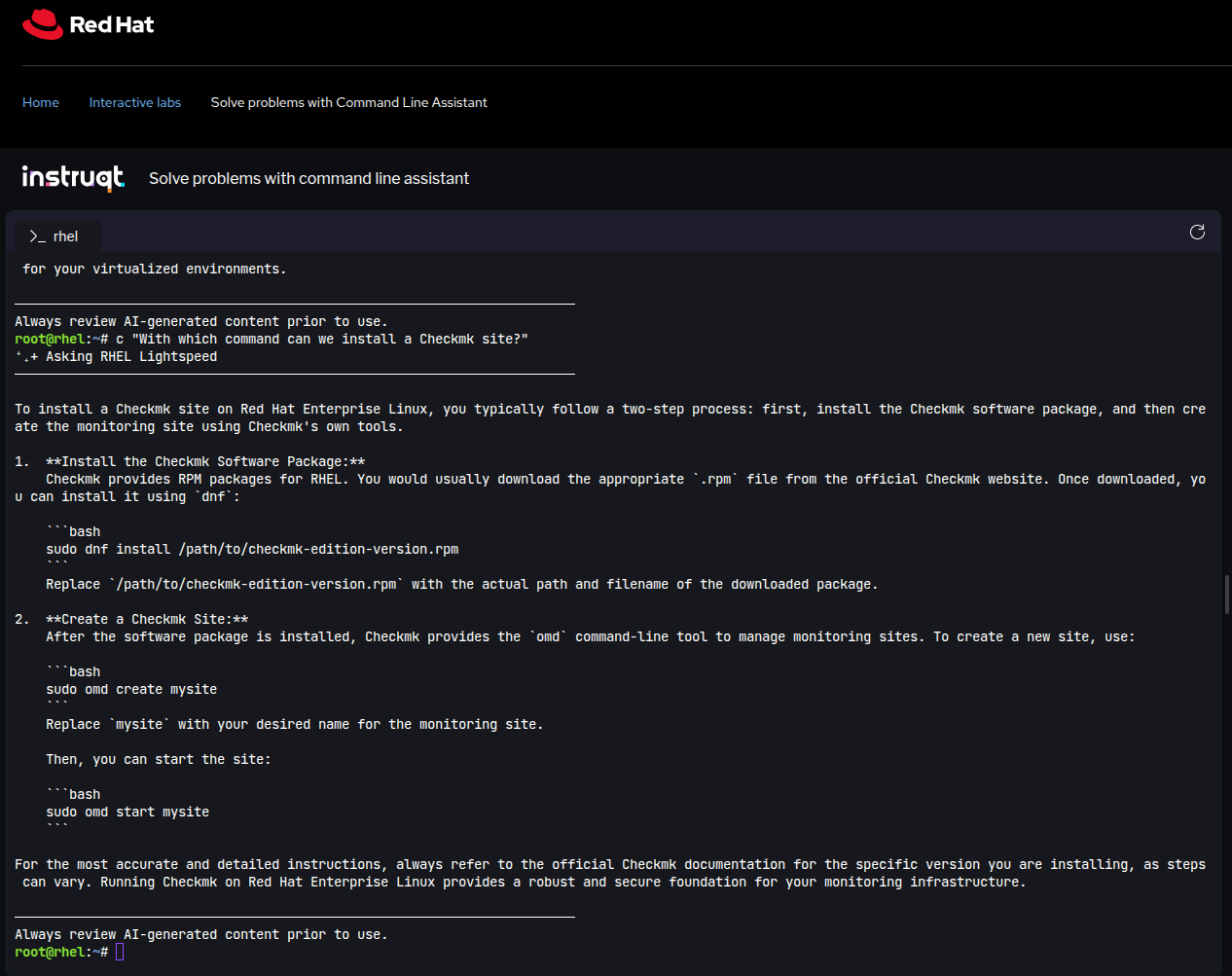
The AI assistant for the command line has been fed with Red Hat's extensive RHEL documentation and the RHEL Knowledge Base and, as is usual with such tools, can be controlled in natural language – directly in your terminal. Linux newbies can use it as a low-threshold tutor to expand their RHEL and monitoring knowledge, while experienced employees should be able to use it to speed up and deepen their work. Things get really exciting with Image Mode and Image Builder, including Lightspeed, which we would now like to introduce to you in more detail.
Simplify workflows with Image Mode
With Image Mode, Red Hat offers you the option of building Red Hat Enterprise Linux as a boot container image (bootc). In the Image Mode, RHEL is packaged into an image that can be run in any environment, from bare metal to hybrid cloud settings. This makes it easier to share and edit across team and system boundaries. Image Mode makes it relatively easy to integrate Red Hat Enterprise Linux 10 into DevOps and CI/CD workflows. For use in hybrid environments, RHEL offers a ready-to-use cloud image. RHEL's Image Mode comes into play here as well: it allows you to package runtime environments and dependencies into a comprehensive single image and deploy them in your hybrid cloud environment.
If something goes wrong, you can quickly restore previous images. Updates can be rolled out as complete images, resulting in more consistent system behavior. This makes updates and rollbacks easier to accomplish. If you manage a larger server cluster, there is no need to update RPM packages individually. With Image Builder (a bootc tool), you can create a new RHEL image, upload it to a registry, and instruct the servers to obtain the new image from there. Installation or deployment is a one-time task. You can enable automatic updates and configure (or disable) maintenance windows. Version control and automated processes in Image Mode help you reduce manual intervention and automate administrative tasks. Image Mode also allows you to create pre-hardened images by specifying guidelines for the build phase. This allows security and compliance requirements to be taken into account at an early stage of the project so that they don't come back to haunt you later.
When building your RHEL 10 images, the integrated Image Builder scans your package selection, provides you with relevant product lifecycle information (EOL data), and recommends packages that match your preselection. This gives you an overview at build time and makes it easy to still make adjustments. Red Hat calls the feature that provides this information ‘Lightspeed’ (a further development of “Red Hat Insights”). Lightspeed can show you upcoming changes, put new and deprecated or discontinued features on your radar, and use this information to create a roadmap of how future updates will affect your existing environment.
On the safe side with FIPS and strict OpenSSL
Last but not least, security features such as FIPS and OpenSSL are one of the biggest innovations showcased by Red Hat. OpenSSL is part of every newer Linux distribution and is therefore nothing special. However, the Federated Information Processing Standards (FIPS) require a particularly strict OpenSSL configuration. Together, the two features are intended to better protect systems running RHEL 10.x in the future with regard to new post-quantum cryptography standards. This refers to the fact that ongoing advances in quantum computing are making existing encryption patterns more vulnerable, as attackers will be able to crack passwords and encryption faster and faster in the future. This is still a hypothetical scenario in some respects. However, government agencies and large organizations in particular are bound by newer encryption techniques in accordance with FIPS. Achieving FIPS compliance is a complex process that ties up resources in companies and government agencies and requires forward planning.
This poses a general challenge for developers of monitoring software such as Checkmk, since requirements for FIPS compliance diverge from the needs of comprehensive monitoring, depending on the setup. FIPS requires the hard deactivation of outdated algorithms that are essential for monitoring legacy applications or legacy hardware. As a RHEL administrator, depending on the condition of the hardware and applications to be monitored, it could be quite a challenge to find the right balance for your organization, internal compliance requirements, and the most comprehensive monitoring possible. Checkmk is actively working to offer viable compromises with current and future packages for RHEL and other enterprise Linux operating systems.
On the path to FIPS compliance, the Checkmk server is usually the last system that system administrators make FIPS-compliant – due to the specific monitoring requirements of legacy hardware and apps, which cannot always be reconciled with FIPS requirements. FIPS compliance is a lengthy process, so it's worth staying on top of the issue and actively monitoring what Red Hat and other vendors are bringing to market from now and into the future.
Red Hat's commitment to stricter OpenSSL and FIPS poses a challenge in terms of adaptation, as Red Hat has almost completed its FIPS compliance and adaptation is lagging somewhat behind. It is particularly important for companies, government agencies, and organizations with particularly strict regulations to actively test the latest operating system versions, such as RHEL 10, for consistency with their own and external requirements. In its release notes, Red Hat promises far-reaching security improvements that will be based on RHEL 10 in the future – we will keep an eye on this and recommend active and proactive testing.
Retrospective: What we learned from RHEL in 2025
An honest review at the end of the year: Many users were restless in 2025 because the porting process, especially for RHEL 10, took so long this time around. What was going on?
For capacity reasons, Checkmk had given lower priority to technical support for Ubuntu version 25.04 (STS) than for the LTS versions of Ubuntu. With internal STS support, some important preliminary work for supporting RHEL 10 would have been off the table in early summer, such as support for the GNU Compiler Collection GCC 14. We have since resumed internal porting for all regular STS Ubuntu versions (‘Short-Term Support’ versions, each of which receives nine months of support by their provider Canonical).
The new compiler required extensive customization work on our packages by the Checkmk development teams. One major showstopper was the C++ library, which has to be built in a separate step. We simply started too late. What we learned from this dry spell: Checkmk's internal support for the STS versions of Ubuntu is crucial for getting started promptly with larger enterprise versions. Lesson learned.
In 2026, SLES 16 and Ubuntu 26.04 are just around the corner, Ubuntu being the primary Linux distribution in the DACH region: With an eye on the upcoming major Linux OS versions, we have vowed to do better. Our internal processes have already been optimized, and we are therefore looking forward to the new year with confidence.